At home
Call everyone down for dinner without shouting up the stairs.
Walkie-talkie for iPhone and Apple Watch
Talk with your partner, your family or your group the way a radio works: hold, speak, let go. At home, across town or across the world — built to sip battery, with emergency tools one tap away.
Free · No ads · iPhone and Apple Watch

Try it — press and hold
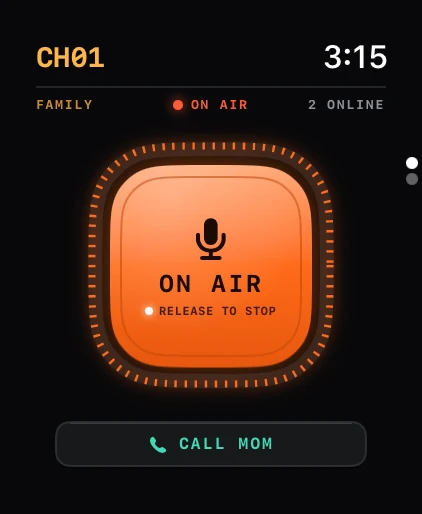
No dialing, no typing. Hold the key and speak — your room hears you right away. Tap to lock the line open for hands-free talk. Voice messages also become text on your iPhone, so people can read them later.
EVERYWHERE
Not just for the trail. Nearever is the same one-button radio wherever your people are.
Call everyone down for dinner without shouting up the stairs.
Find each other at the mall, the game or the festival.
Keep the group together at the airport, the station or the theme park.
Over Wi-Fi or data, talk across countries like you're in the same room.
Back-by timers, rescue card and low-power tools for hikes and rides.
Check in with one tap while everyone spreads out along the shore.
Where in-flight Wi-Fi allows, message the people waiting for you.
Talk, rooms and calls work over Wi-Fi or cellular data. The signal tools work with no connection at all.
LOW POWER
A long hike, a full day out, no charger. Nearever is built to use as little power as possible, so more of your battery is left for the way home.
The screen goes black and your iPhone can sleep, and you stay on air. Double-tap to wake.
One switch makes Nearever dark, dim and still: the crash check sensor turns off and alerts refresh less often.
Trip tracking uses a lighter GPS setting picked for your activity, and stops when the trip ends.
Flashlight, whistle, siren, screen SOS and your rescue card need no network at all.
Battery life is our top priority, and we keep working to make it last longer.
Everything sits on one dock at the bottom of the screen, so the right tool is one tap away on a good day and a bad one.


01 · TALK
Hold the big key to talk, or tap to keep the line open. Nearever uses Apple's Push to Talk, so you can hear your room and answer from the Lock Screen or with the Action Button.
02 · SAFE
Tap I'M SAFE to let your people know you're fine. Hold HELP for 2 seconds to send a help message with your location. Send your location or open your rescue card in one tap.
03 · TRIP
Before a hike, run, ride or night out, set when you'll be back. If you're late, Nearever reminds you and helps you text your family your location. Nothing is sent without you.
04 · SURVIVE
Flashlight dial, distress whistle, siren and a flashing screen SOS — all work with no signal. Keep talking with the screen off to make your battery last longer.
05 · RADIO
Active National Weather Service alerts for where you are, read aloud, plus nearby earthquakes from the U.S. Geological Survey. Nearever is not affiliated with any agency.
Rooms, calls and safety tools in one calm, radio-style app.
Make a room for your partner, your family or your hiking group and invite people with a link. Talk, or switch to chat. Family, private and Direct rooms are end-to-end encrypted.
Call the people you link with. Calls ring like a regular phone call, even when your iPhone is locked.
While Nearever is open or a trip is running, a hard impact or a fall makes it ask if you're OK. With no answer in 30 seconds, a text with your location opens, ready to send.
Ask Siri to send or read room messages and call your people. On iPhones with an Action Button, set it to talk without unlocking.
Set a room to auto-delete messages after 24 hours, 7 days or 30 days, or turn on TALK ONLY to talk live without a transcript.
Available in English, Korean, Japanese, Spanish, French, German, Portuguese (Brazil) and Simplified Chinese.
APPLE WATCH
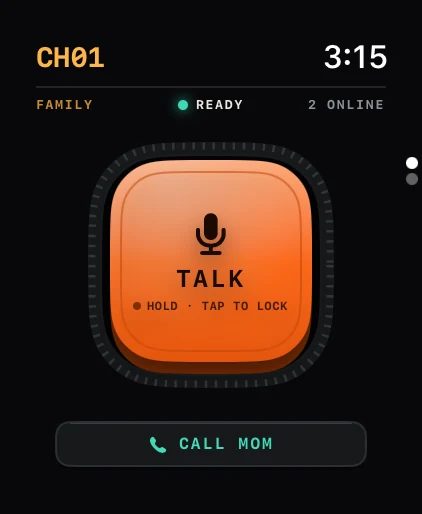
On Apple Watch, hold the talk key to talk through your iPhone, read your latest messages and call your favorite person — without reaching for your phone.
Messages, voice clips and locations in family, private and Direct rooms are encrypted on your phone. Our server stores only the encrypted form.
We don't sell your data and don't use it for ads.
Nearever doesn't ask Apple for your name or email.
Report messages, people, rooms and calls, and block people. Accounts are for ages 13 and up; public rooms are for adults.
Read how we protect your messages
Nearever is not an emergency service and does not contact emergency services for you. In an emergency, call your local emergency number. Alerts can be delayed; follow local officials.
Nearever is free to download and use. There are no ads.
Talking, rooms and calls need an internet connection (cellular or Wi-Fi). The flashlight, whistle, siren, screen SOS and rescue card work with no signal at all.
In family, private and Direct rooms, messages are encrypted on your phone and our server stores only the encrypted form. Public rooms are not end-to-end encrypted so they can be moderated — treat them as public.
An iPhone with iOS 17.4 or later. Apple Watch with watchOS 10 or later is optional. Accounts are for ages 13 and up.
No. Nearever does not contact emergency services. It helps you reach your own people. In an emergency, call your local emergency number.
NEAREVER for iPhone and Apple Watch.